
Deezer APK Latest Version
★★★★☆ 4.3 · (12.1M Reviews)
9.0.20.2
71.12 MB
1B+
OS 8+
100% Secured & Verified APK Files
App Preview
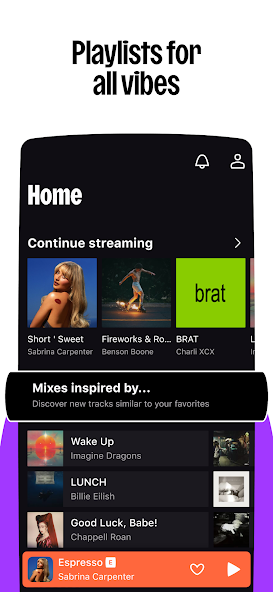

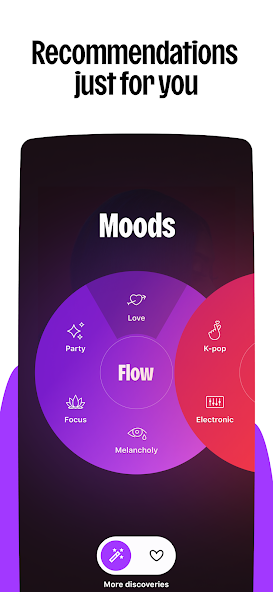
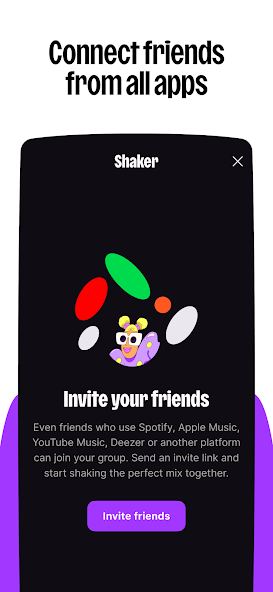
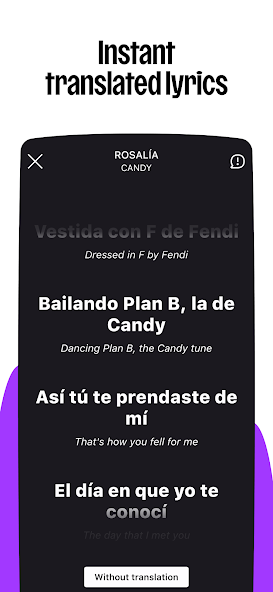
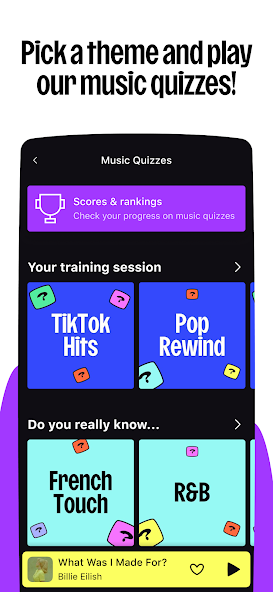
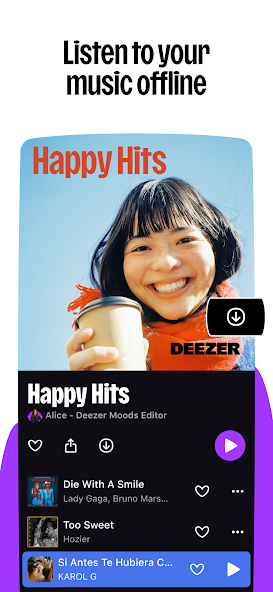
Streaming music has become the heartbeat of how people enjoy sound today, and when you want a service that blends deep music discovery with a clean, modern interface, Deezer is one of the names that consistently shows up. If you have been searching for a smooth way to get Deezer running on your Android device through an APK file, you are in the right place. This guide walks you through everything you need to know about the Deezer APK, what it offers, how to install it, and how to get the most out of it on your phone or tablet.
We built this resource for nitroapk.com readers who want a single, honest, and complete page that covers the app, the features, the install steps, the pros, the cons, and the small details that make Deezer feel like home for music lovers.
What Exactly Is Deezer APK
Deezer is a French music streaming service that launched back in 2007, and it has grown into one of the largest audio platforms on the planet. The Deezer APK is the Android Package Kit file that lets you install the official Deezer app on Android devices. Think of it as the same app you would normally download from the Google Play Store, but delivered in a single installable file that you can sideload.
The APK is particularly useful when:
- The Google Play Store is not available on your device
- Your device is not compatible with the latest Play Store version
- You want to install an older or beta version of the app
- You simply prefer manual installation
Deezer gives you access to a catalog of more than 90 million tracks, thousands of curated radio stations, podcasts, audiobooks, and a Flow feature that learns what you like and serves up a personal mix you will actually enjoy.

Key Features That Make Deezer Stand Out
Deezer packs a long list of features that are worth understanding before you install the APK. Here is what you can expect once the app is up and running.
Massive Music Library
Deezer hosts over 90 million tracks across every genre you can imagine. From mainstream pop, hip hop, and EDM to regional folk, classical, jazz, and indie, the catalog is broad enough to satisfy almost any listener.
Flow: Your Personal Soundtrack
Flow is Deezer’s signature feature. It combines your favorite tracks, recommended songs, and lesser-known gems into a single endless stream that gets smarter every time you use it.
High Fidelity Audio
Deezer is one of the few mainstream services that offers true lossless CD-quality audio (1411 kbps FLAC) on its HiFi tier.
Lyrics on Screen
Live lyrics appear in real time as songs play, which is a great touch for anyone who likes to sing along or analyze the words.
Cross Device Sync
Your account syncs across phones, tablets, desktops, smart TVs, smart speakers, and even some car systems. Start a song in the kitchen, finish it in the car, and pick up where you left off on your laptop later.
Offline Listening
Premium users can download songs, albums, and playlists to listen without an internet connection. This is perfect for flights, road trips, subway commutes, or anywhere the signal is weak.
Podcasts and Audiobooks
Beyond music, Deezer also offers a strong selection of podcasts in many languages, and on some tiers, audiobooks are bundled in as well.
Family Plans
Deezer Family lets up to six family members share one subscription, and each person gets their own personalized account, recommendations, and listening history.
Deezer APK Technical Details
Before you download, it helps to know what you are working with. Here is a quick overview of the key details for the latest Deezer APK build.
| Detail | Information |
|---|---|
| App Name | Deezer: Music & Podcast Player |
| Latest Version | 8.0.x (updated regularly) |
| APK Size | Around 35 to 45 MB |
| Developer | Deezer S.A. |
| Category | Music and Audio |
| Android Required | Android 8.0 and above |
| License | Free with in-app premium plans |
| Content Rating | Teen |
| Languages Supported | 180+ including English, Spanish, French, Hindi, Portuguese |
| In App Purchases | Yes (HiFi, Family, Student plans) |
Always check the file size and version number before installing, since updates roll out often and you want the freshest build with the latest security patches.
How to Download and Install the Deezer APK
Installing the Deezer APK is a simple process, but you want to do it right to keep your device safe. Follow these steps carefully.
Step 1: Enable Installation from Unknown Sources
Open your phone’s Settings, go to Security or Apps and Notifications, and toggle the option to allow installations from unknown sources. On newer Android versions, you may need to grant this permission only to the browser or file manager you are using to open the APK.
Step 2: Download the APK File
Use your mobile browser to visit nitroapk.com or your preferred trusted APK source and grab the latest Deezer APK. Make sure the file you download is the official one and not a modified copy.
Step 3: Locate the File
Open your file manager and head to the Downloads folder, or check your browser’s download list. You should see a file named something like deezer.apk.
Step 4: Tap to Install
Tap the APK file. A confirmation screen will appear with the permissions the app is asking for. Read them through, then tap Install.
Step 5: Open and Sign In
Once the install finishes, tap Open. You can now create a new Deezer account, sign in with an existing account, or continue with a social login option.
Step 6: Customize Your Profile
Pick a few favorite artists and genres so Deezer can start shaping recommendations for you right away. The more you tell it upfront, the better the Flow experience becomes.
Step 7: Set Your Audio Quality
If you are on a premium plan, open Settings, then Audio Quality, and pick the option that matches your setup. HiFi users can choose FLAC for the best sound.
How to Use Deezer Once It Is Installed
Deezer is designed to be intuitive, but knowing where things live saves time. Let us walk through the main screens you will use every day.
The Home Tab
This is where new releases, mood playlists, and editorial picks live. You will also see suggested albums and podcasts tailored to your taste.
The Search Tab
Tap the magnifying glass icon to look up any artist, song, album, playlist, podcast, or user. Search is fast and the autocomplete suggestions help you find what you want even if you only know a few letters of the name.
The Flow Tab
This is your personal stream. Tap it whenever you want a hands free listening experience that mixes your favorites with fresh tracks.
My Library
Everything you have saved, liked, downloaded, or added to a playlist lives here. It is also where you can create new playlists, sort your music by artist or album, and manage offline content.
The Now Playing Screen
Tap any song to open this screen. From here you can like a track, add it to a playlist, share it, view the lyrics, and access the equalizer.
Pros and Cons of Using Deezer
Every music app has its strengths and its trade-offs. Here is an honest look at what you get with Deezer.

Advantages
- Huge catalog of over 90 million tracks
- FLAC lossless audio on HiFi
- Flow feature is genuinely fun to use
- Live lyrics on every track
- Multi device sync works smoothly
- Clean and easy to use interface
- Good podcast collection
Disadvantages
- Free tier is limited with ads and skips
- Premium price is higher than some rivals
- Catalog depth varies in smaller regions
- No social feed like Spotify has
- Family plan regions are limited
- Offline downloads are paid only
- App can feel heavy on low end devices
Deezer Plans and Pricing at a Glance
Deezer offers a few tiers so you can pick what fits your needs.
| Plan | Price (approx) | What You Get |
|---|---|---|
| Free | 0 | Ads, limited skips, standard quality |
| Premium | 10.99 per month | No ads, unlimited skips, high quality audio |
| HiFi | 14.99 per month | Lossless FLAC audio, offline downloads |
| Family | 19.99 per month | Up to 6 accounts, each with own profile |
| Student | 5.99 per month | Discounted premium for verified students |
Prices may vary slightly by country and currency, and there is usually a 30 day free trial for new premium users.
Tips and Tricks to Get the Most Out of Deezer
A few small habits can make Deezer feel even better on a daily basis.
Use Flow Daily
The more you use Flow, the better it gets. Give it thumbs up and thumbs down feedback regularly so it knows exactly what you love.
Create Smart Playlists
Combine your favorite songs with mood tags so the right playlist is always one tap away for driving, working, sleeping, or working out.
Save Songs You Discover
Tap the heart on any track you enjoy. Deezer will use this to refine recommendations and serve you more of what you love.
Enable Offline Mode Before Trips
If you know you will be off Wi-Fi, download your top playlists in advance. Head to the playlist, tap the three dots menu, and choose Download.
Adjust the Equalizer
Inside Settings, open Audio and then Equalizer. Pick a preset like Bass Boost, Treble Boost, or Vocal that matches your headphones.
Use Sleep Timer
When you listen at night, set a sleep timer so the app stops playing after a set time. It is a small feature that makes a big difference.
Connect to Your Car
If your car supports Android Auto, plug your phone in or connect over Bluetooth. Deezer integrates well with most modern car systems.
Frequently Asked Questions About Deezer APK
Troubleshooting Common Deezer APK Issues
Sometimes things do not go perfectly, and here are quick fixes for the most common issues.
App Crashes on Launch
Clear the app cache, restart your phone, and if the issue persists, reinstall the latest APK.
Login Problems
Double-check your email and password. If you forgot your password, use the Forgot Password link on the login screen to reset it.
Songs Will Not Download
Make sure you have enough free storage on your device. Also, confirm you are on a premium plan since offline mode is a paid feature.
Audio Skips or Stutters
Switch from Wi-Fi to mobile data or vice versa. If the problem is constant, lower the audio quality in Settings.
Lyrics Are Missing
Not every track has synced lyrics. Try tapping the lyrics icon while the song plays. If nothing shows, the lyrics for that song are not available yet.
App Feels Slow
Close other apps running in the background, free up RAM, and ensure your Android version is supported.
Is Deezer the Right Music App for You?
The honest answer is that Deezer is a strong choice for listeners who care about sound quality, want a smart personal stream, and prefer a clean interface. It might not be the best fit if you are looking for a completely free experience with no limits, or if you are deeply tied to another ecosystem like Apple Music or YouTube Music.
For many users, the lossless audio on HiFi is a real selling point, especially if you already own good gear. The Flow feature is also a major plus for anyone who wants a set it and forget it listening experience.
Final Thoughts
The Deezer APK gives you a flexible way to install one of the most well-rounded music apps on Android, with a library that rivals the biggest names in streaming and a few unique features that help it stand out. Take a few minutes to explore the app, build your library, and let Flow learn your taste. Within a week, you will have a personal soundtrack that feels like it was made just for you.
If you want a smooth, ad-free, high-quality music experience on Android, give Deezer a try. You can grab the latest APK right here on nitroapk.com and start listening in minutes.