GoPro Quik APK Latest Version
★★★★☆ 4.3 · (10k Reviews)
13.39.2
257MB
5M+
OS 7+
100% Secured & Verified APK Files
App Preview

Introduction
In the world of mobile video editing, few apps have managed to earn the kind of loyal following that GoPro Quik has built over the years. Originally designed as a companion tool for GoPro action cameras, Quik has evolved into a full-featured photo and video editor that any Android user can download and enjoy even without owning a GoPro device. With its sleek interface, AI-powered editing tools, and a growing library of templates and transitions, GoPro Quik APK for Android 2026 stands out as one of the most capable and user-friendly editing apps available on the platform today.
Whether you are a content creator, a travel vlogger, a social media enthusiast, or simply someone who wants to turn everyday moments into cinematic memories, GoPro Quik delivers powerful tools without the steep learning curve that usually comes with professional video editing software. In this detailed article, we will walk you through everything you need to know about GoPro Quik APK its features, what is new in the latest 2026 version, how to install it on your Android device, and why it deserves a top spot on your smartphone.
What Is GoPro Quik?
GoPro Quik is a video and photo editing application developed by GoPro Inc. It was originally launched to help users automatically edit footage captured on GoPro cameras, but over time it expanded its compatibility to include footage from any Android device — including standard smartphone cameras, drone cameras, and third-party action cameras.
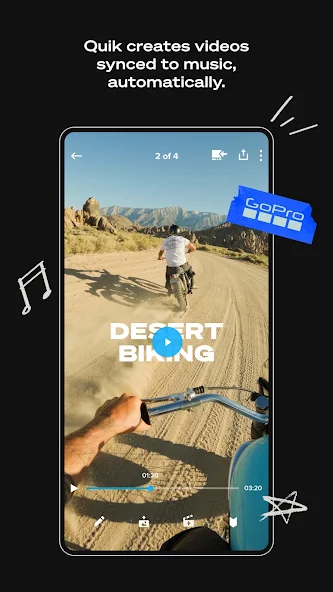
The core idea behind Quik is simplicity with depth. The app is built around the concept of automatic editing powered by artificial intelligence. Users can import their clips and photos, select a music track and a theme, and let Quik do the heavy lifting. The AI analyzes the footage, identifies the best moments, syncs cuts to the beat of the music, and produces a polished highlight reel in seconds.
However, Quik is not just an automatic editor. It also offers a full suite of manual editing tools for users who want more control, including trimming, color grading, speed adjustments, text overlays, and much more.
Key Features of GoPro Quik APK 2026
The 2026 version of GoPro Quik comes loaded with features that make it one of the most complete mobile video editors available on Android. Here is a breakdown of everything the app brings to the table.
1. AI-Powered Auto Editing
At the heart of Quik is its intelligent auto-edit engine. Once you import your photos and video clips, the AI scans all the content, identifies highlight moments such as action sequences, smiling faces, and dramatic landscape shots, and assembles them into a compelling story automatically. It then syncs every cut and transition to the rhythm of whatever music track you have selected. The result is a professional-looking video without any manual editing at all.
This feature is particularly useful for people who capture a lot of footage but never get around to editing it. With Quik, a full day of travel footage can be turned into a shareable highlight video in under a minute.
2. Mural — Your Personal Media Library
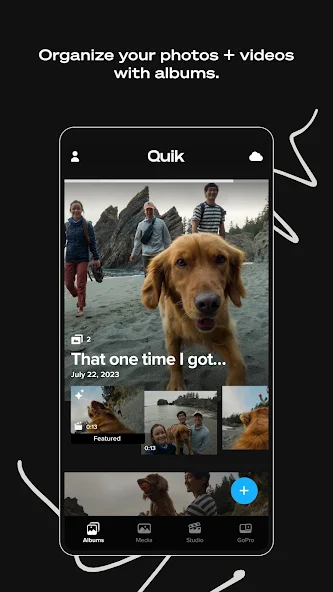
One of the standout features introduced in recent versions of Quik is Mural, a visual media hub that organizes all your photos and videos in a beautiful, interactive timeline. Rather than scrolling through a flat gallery, Mural presents your memories in a dynamic, story-driven layout that makes it easy to find and relive moments. It works across all your content — whether you shot it with a GoPro, your phone camera, or any other device.
3. Speed Control and Ramping
GoPro Quik gives users precise control over video speed. You can slow down clips for dramatic slow-motion effects, speed them up for time-lapse style sequences, or create speed ramps — a popular cinematic technique where the video transitions smoothly between different speeds within a single clip. Speed ramping is a feature usually reserved for desktop editors, and having it on mobile is a significant advantage for creators who edit on the go.
4. Color Grading and Filters
The app includes a comprehensive set of color grading tools. Users can adjust exposure, contrast, saturation, shadows, highlights, temperature, and sharpness with intuitive sliders. There is also a collection of preset filters that apply cinematic color grades with a single tap. For GoPro footage specifically, Quik automatically applies lens correction to counteract the wide-angle distortion characteristic of GoPro cameras.
5. Music Sync and Audio Tools
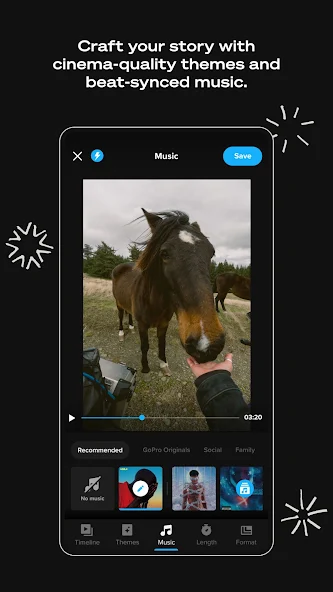
Music is central to the Quik experience. The app comes with a built-in library of licensed music tracks spanning multiple genres — from high-energy electronic and hip-hop for action sports content, to ambient acoustic and cinematic orchestral for travel and lifestyle videos. All tracks in the library are cleared for use on social media platforms, so you do not need to worry about copyright issues when sharing your videos.
Beyond music, Quik also gives you control over audio levels, allowing you to balance the original audio from your clips with the background music track. You can also add voiceovers directly within the app.
6. Text and Title Overlays
Adding text to videos is quick and flexible. Quik offers a variety of font styles, animations, and positioning options for titles, captions, and subtitles. You can set text to appear and disappear at specific timestamps, choose from dozens of animation styles, and customize colors to match your video’s aesthetic.
7. Trim, Cut, and Multi-Clip Editing
For users who want manual control, Quik provides a full timeline-based editing interface. You can trim clips to exact in and out points, reorder clips by dragging, cut specific segments, and join clips with transitions. The editing timeline is touch-optimized and responds smoothly even on mid-range Android devices.
8. Templates and Themes
Quik includes a growing library of pre-built video templates. These templates define the structure of your video — including transitions, text placement, pacing, and visual effects — so you only need to swap in your own footage. Templates are organized by occasion and style, including categories like travel, sport, family, birthday, and cinematic. New templates are added regularly with app updates.
9. 4K and High Frame Rate Support
The 2026 version of Quik fully supports 4K video editing and export on compatible Android devices. It also handles high frame rate footage — including 60fps, 120fps, and 240fps clips — making it ideal for editing slow-motion content shot on both GoPro cameras and modern Android smartphones that support high frame rate recording.
10. Cloud Backup and Cross-Device Sync
GoPro Quik subscribers get access to unlimited cloud storage for their original media files through the GoPro subscription plan. This means your raw footage is automatically backed up to the cloud and accessible from any device — your Android phone, tablet, or desktop. For free users, the app still offers local editing with selective cloud uploads.
What Is New in GoPro Quik 2026?
The 2026 update brings meaningful improvements across the board. Here is what has changed and improved in the latest version.
Improved AI Scene Detection: The auto-edit engine has been significantly improved with a more advanced AI model that better understands context — distinguishing between slow lifestyle moments and fast action sequences to create more emotionally resonant edits.
New Template Pack: A fresh batch of templates has been added, designed specifically around trending social media formats including vertical short-form videos optimized for platforms like Instagram Reels and TikTok.
Better Performance on Android: The 2026 version has been optimized to take advantage of the latest Android chipsets, resulting in faster rendering times and smoother timeline scrubbing on devices running Snapdragon 8-series and MediaTek Dimensity processors.
Enhanced Audio Visualizer: The music sync engine now includes a visual beat map in the timeline, letting you see exactly where the beats fall and manually adjust your cuts to match with greater precision.
Expanded Font Library: More than 30 new fonts have been added to the text tool, including handwritten, bold display, and minimalist modern styles.
Bug Fixes and Stability Improvements: The 2026 update also addresses several stability issues reported in earlier builds, particularly around importing large video files and exporting in 4K.
GoPro Quik APK: App Information
| Detail | Info |
|---|---|
| App Name | GoPro Quik |
| Developer | GoPro Inc. |
| Category | Photo & Video Editing |
| Platform | Android |
| Version | Latest 2026 |
| File Size | Approximately 80–100 MB |
| Android Requirement | Android 7.0 and above |
| Subscription | Free with optional GoPro subscription |
| Languages | Multiple languages supported |
How to Download and Install GoPro Quik APK on Android
Installing GoPro Quik APK on your Android device is a simple process. Follow these steps carefully to get the app running on your phone or tablet.
Step 1 — Enable Unknown Sources Before installing any APK file on Android, you need to allow your device to install apps from sources outside the Google Play Store. Go to your device Settings, then navigate to Security or Privacy, and toggle on the option that allows installation of apps from unknown sources. On newer Android versions (Android 10 and above), this permission is granted per-app rather than globally, and you will be prompted automatically when you attempt to install.
Step 2 — Download the APK File Download the latest GoPro Quik APK file from a trusted source. Make sure the file is the latest 2026 version to enjoy all the features described in this article. Check the file size and version number before proceeding to ensure you have the correct file.
Step 3 — Locate the Downloaded File Once the download is complete, open your device’s file manager app and navigate to the Downloads folder. You will find the APK file there, typically named something like GoPro-Quik-vX.X.X.apk.
Step 4 — Tap to Install Tap the APK file to begin the installation process. Android will display a prompt asking you to confirm the installation. Review the permissions the app requests and tap Install to proceed. The installation usually takes less than a minute.
Step 5 — Open and Set Up Once installed, tap Open to launch GoPro Quik. You will be guided through a brief onboarding process where you can sign in with a GoPro account or continue as a guest. Grant the necessary permissions for media access and you are ready to start editing.
Is GoPro Quik Free?
GoPro Quik is available as a free download and offers a solid set of features at no cost. Free users can import and edit videos, use basic templates, access the music library, and export finished videos. However, some advanced features including unlimited cloud backup, full access to the premium template library, and certain AI-powered tools are reserved for GoPro subscription holders.
The GoPro subscription is a paid annual plan that also includes GoPro camera discounts, camera replacement coverage, and other perks beyond just the app features. For users who only need the editing app, the free tier is genuinely capable and more than sufficient for most everyday editing tasks.
GoPro Quik vs Other Video Editing Apps for Android
There are many video editing apps available on Android, but GoPro Quik holds its own against the competition in several key areas.
Compared to CapCut, which is also popular for short-form social media videos, Quik offers better integration with action camera footage and superior slow-motion handling. CapCut has a slight edge in its template variety for trending social media effects, but Quik’s AI auto-editing is more sophisticated.
Compared to Adobe Premiere Rush, Quik is lighter, faster to use, and more beginner-friendly, while Rush offers deeper manual control and better integration with Adobe’s desktop ecosystem for professional workflows.
Compared to InShot, Quik offers more powerful AI features and better music synchronization, while InShot remains a strong choice for basic cutting and caption work.
For anyone who primarily shoots with a GoPro camera or wants the best mobile auto-editing experience available, Quik is the clear winner.
Tips to Get the Best Results With GoPro Quik
To make the most of your GoPro Quik experience, keep these practical tips in mind.
Shoot in high quality — Quik’s AI works best when it has sharp, well-exposed footage to analyze. Shoot in the highest quality your device allows.
Import variety — Give the auto-edit engine a mix of wide shots, close-ups, slow-motion clips, and still photos. Variety gives the AI more to work with and produces more dynamic edits.
Choose music first — Selecting your music track before triggering the auto-edit can lead to better pacing, as the AI tailors its cuts to the energy of the song.
Use speed ramping on key moments — Apply speed ramps at emotional or dramatic peaks in your footage for a cinematic feel that elevates the entire video.
Export in 4K when possible — If your device supports it, always export in the highest resolution available to preserve quality for future use.
Final Verdict
GoPro Quik APK for Android in 2026 is one of the most well-rounded and user-friendly video editing apps you can put on your smartphone. It strikes an impressive balance between automatic simplicity and manual depth, making it genuinely useful for beginners and experienced creators alike. The AI editing engine continues to improve with each update, and the 2026 release brings meaningful enhancements in performance, templates, and audio tools that keep the app feeling fresh and competitive.
Whether you are editing family vacation footage, extreme sports clips, travel vlogs, or everyday moments, GoPro Quik gives you the tools to tell your story beautifully right from your Android device. Download the latest version today from nitroapk.com and start creating videos that are worth sharing.