KineMaster APKLatest Version
★★★★☆ 4.3 · (12.1M Reviews)
8.1.15.36566.GP
108 MB
500M+
OS 7+
100% Secured & Verified APK Files
App Preview

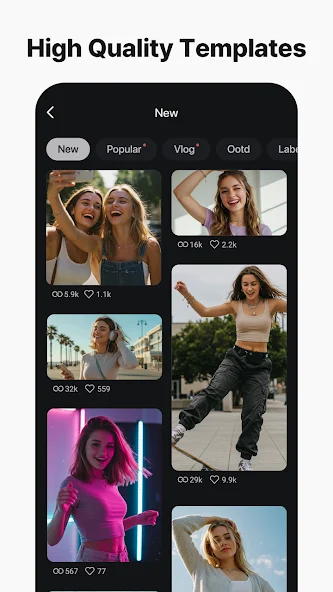

Mobile video editing has grown from a niche hobby into a daily habit for millions of Android users, and KineMaster has remained one of the most trusted names in that space for years. Long before short-form video took over every platform, KineMaster was already giving mobile creators multi-layer editing power that used to be reserved for desktop software. In 2026, the app continues to refine that formula, combining a precise editing timeline with modern AI-assisted tools, making it a strong choice for anyone who wants real creative control without needing a computer.
This guide covers everything worth knowing about the KineMaster APK this year: what the app actually offers, why it remains a favorite among serious mobile editors, how it compares to lighter template-based apps, installation steps, system requirements, and answers to the most common questions new users have.
What Is KineMaster APK?
KineMaster APK is the installable Android package for KineMaster, a full-featured video editing application built for smartphones and tablets. Unlike simpler editors that focus mainly on quick templates, KineMaster is designed around a true multi-layer timeline, giving users the kind of granular control found in desktop editing suites but built entirely for touch-screen workflows.
The app supports multiple video layers, audio tracks, image overlays, text layers, and effect layers stacked on top of one another, all adjustable frame by frame. This layered approach is what sets KineMaster apart from many other free Android editors, which often limit users to a single video track with basic trim and transition tools.
Why KineMaster Remains Popular in 2026
Even with newer, flashier editing apps constantly launching, KineMaster has held its position for a few clear reasons:
- Precision editing. Frame-accurate trimming and layer positioning give creators control that template-driven apps simply don’t offer.
- Professional-grade output. Support for high resolutions and smooth exports makes it suitable for creators who care about final video quality.
- Consistent updates. The app has a long track record of steady feature updates rather than long stretches of stagnation.
- Balance of power and usability. It offers advanced tools without burying them in an overly complicated interface.
- Cross-genre versatility. It works equally well for vlogs, tutorials, promotional content, short-form clips, and longer-form storytelling.
Key Features of KineMaster for Android
Multi-Layer Timeline Editing
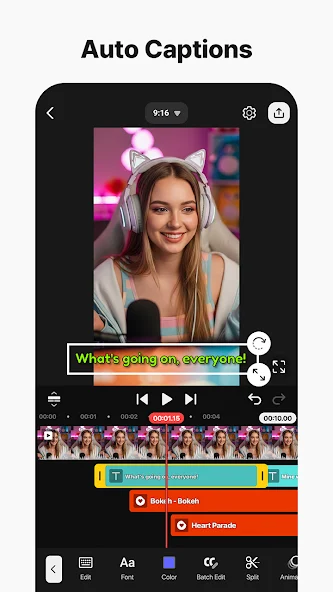
The core of KineMaster is its layered timeline. Users can stack multiple video clips, images, text boxes, stickers, and effect layers, then control exactly how and when each one appears, moves, or fades. This layered structure is ideal for building more visually complex videos, like split-screen comparisons, picture-in-picture reactions, or animated overlays synced precisely to the footage below.
Precise Trimming and Cutting Tools
Frame-by-frame trimming lets editors cut exactly where they want, without the rounding or snapping limitations found in more basic apps. This precision matters most for creators who need tight, rhythm-matched cuts.
Chroma Key (Green Screen) Support
Built-in chroma key tools allow users to remove solid-colored backgrounds and replace them with other footage or images, a feature typically limited to more advanced editing software. This opens the door to creative effects, virtual backgrounds, and layered compositions.
Speed Control and Reverse Playback
Clips can be sped up, slowed down, or reversed, with smooth transitions between speed changes. This is especially useful for action sequences, comedic timing, or music-synced edits.
Audio Mixing and Voice Recording
KineMaster includes a proper audio mixing panel, letting users adjust volume levels across multiple tracks, add fade-ins and fade-outs, and record voiceovers directly within the app. Background music, sound effects, and dialogue can all be balanced without needing an external audio tool.
Text, Stickers, and Handwriting
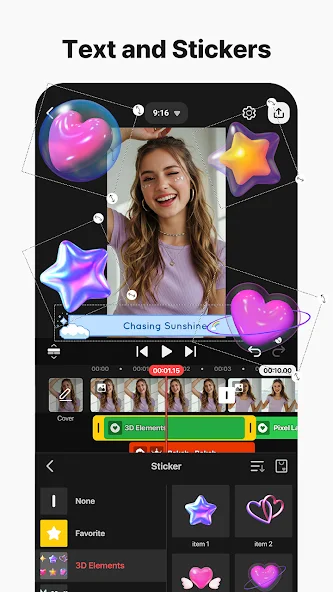
A wide selection of text styles, animated stickers, and a handwriting tool let creators personalize videos with custom callouts, captions, or doodled annotations drawn directly onto the frame.
Color Filters and Adjustment Tools
Built-in color correction and filter presets help creators achieve a consistent visual tone across a video, from natural color balancing to stylized cinematic looks.
Transitions and Visual Effects
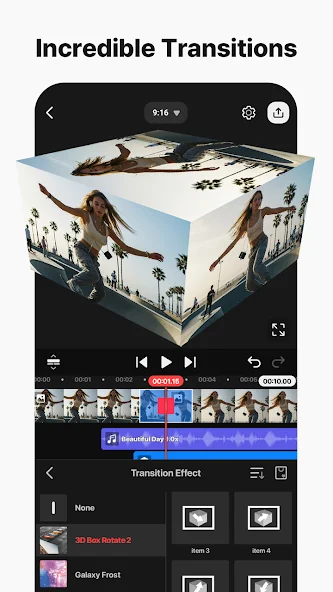
A broad transition library smooths the movement between clips, while a separate effects panel adds visual flourishes like blur, glitch, light leaks, and particle overlays.
AI-Assisted Editing Tools
Newer versions of KineMaster have leaned further into AI-assisted features, including smart scene detection, automated highlight suggestions, and tools that speed up repetitive editing tasks like cutting silence or matching cuts to a beat.
Asset Store
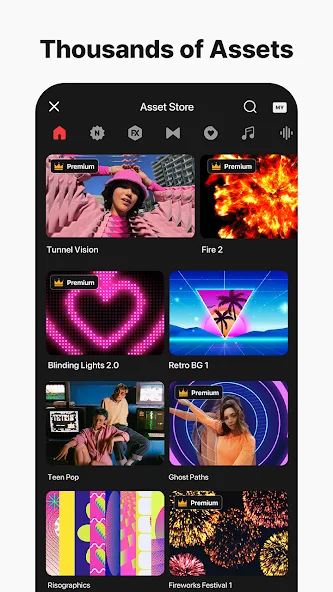
An in-app asset store offers additional music tracks, stickers, fonts, and effect packs, letting users expand their creative toolkit well beyond the app’s default library.
KineMaster vs Template-Based Editors
It’s worth understanding where KineMaster fits compared to lighter, template-first editing apps that have become popular for extremely fast content turnaround:
- Control vs speed: Template-based apps get a video out the door in minutes; KineMaster trades some of that speed for far greater creative control.
- Layer depth: Most template apps support a single or limited number of tracks. KineMaster’s multi-layer timeline supports much more complex compositions.
- Learning curve: KineMaster has a slightly steeper learning curve, but that investment pays off for anyone editing regularly or aiming for a distinct visual style.
- Best use case: Template apps suit quick trend-based clips, while KineMaster suits creators who want their videos to look intentionally crafted rather than assembled from a preset.
Both approaches have their place, and many creators actually use both — a template app for fast daily content, and KineMaster for higher-effort projects where quality matters most.
How to Install KineMaster APK on Android
- Open device settings and enable installation from unknown sources, either globally or for the specific browser or file manager you’ll use to install the file.
- Download the APK file from a source you trust, and confirm the file finishes downloading completely before opening it.
- Locate the file in your downloads folder using your device’s file manager.
- Tap the APK file to start installation, and follow the on-screen prompts through to completion.
- Launch the app once installed, and grant the permissions it requests for storage, camera, and microphone access so it can import and export your media.
- Import your first clips and begin building your project on the timeline.
System Requirements
KineMaster is built to handle demanding multi-layer editing, so a few baseline specs help ensure smooth performance:
- Android 6.0 or higher for stable compatibility
- At least 3GB of RAM recommended for smoother playback with multiple layers active
- Sufficient free internal storage for the app, cached assets, and exported video files
- A reasonably modern processor for faster rendering and export times
- A stable internet connection for downloading assets from the in-app store and for certain AI-assisted features
Tips for Editing Effectively in KineMaster
- Plan your layers before you start. Sketching a rough shot order — main footage, overlays, text, music — saves time compared to building layer by layer with no plan.
- Use keyframes for smooth motion. Animating position, scale, and opacity with keyframes creates noticeably more polished movement than static placement.
- Balance your audio early. Set rough volume levels for music, voice, and sound effects near the start of editing rather than only at the end, so later adjustments are smaller and easier.
- Group repeated effects. If you’re applying the same filter or transition across many clips, apply it once and copy the settings rather than rebuilding it manually each time.
- Preview at full resolution occasionally. Editing previews can hide small quality issues; checking full-resolution playback before exporting catches problems early.
- Export in batches for long projects. For longer videos, exporting in segments can reduce the risk of losing progress if the app is interrupted mid-render.
A Closer Look at the Editing Workflow
Getting comfortable with KineMaster’s workflow makes a real difference in how fast and confidently you can build a finished video. The typical process starts with importing your raw footage and photos into a project, then arranging them on the base video layer in the order you want them to play. From there, additional layers are added one at a time — a music track, a voiceover, a text overlay, maybe a small picture-in-picture clip in the corner.
What makes this workflow feel different from simpler apps is the ability to adjust each layer independently at any point without disturbing the others. Moving a text overlay half a second later, trimming a music track to fit a new cut, or repositioning a picture-in-picture clip can all be done without rebuilding the rest of the timeline. For creators coming from more basic editors, this non-destructive, layer-based approach is often the biggest adjustment — and the biggest upgrade.
Once the layers are in place, most editors move into a polishing pass: fine-tuning transitions between clips, adjusting color and exposure for consistency, balancing audio levels, and adding any final text or stickers. Because KineMaster lets you preview changes in real time, this polishing stage tends to be fast once you’re familiar with where each tool lives in the interface.
Building a Consistent Visual Style
One advantage of a full-featured editor like KineMaster is the ability to develop a recognizable visual style across multiple videos, rather than relying on whatever a template happens to look like. A few practical approaches creators use to stay consistent:
- Save a preferred color filter or adjustment setting and apply it as a starting point on every new project, then fine-tune from there.
- Reuse the same intro and outro layer structure, swapping only the footage and text, so returning viewers recognize your videos instantly.
- Stick to a small set of fonts and text animations rather than a different style every video, which helps build a consistent brand feel over time.
- Keep a personal asset folder of frequently used overlays, sound effects, and transitions so you’re not searching for the same elements repeatedly.
This kind of consistency is much easier to maintain in an editor built around layers and reusable settings than in an app designed primarily around one-off templates.
Performance and Optimization Tips
Multi-layer editing is more demanding on a device than basic single-track editing, so a few habits go a long way toward keeping projects running smoothly:
- Work with lower preview resolution while editing, then switch to full resolution only for final review and export, reducing strain on the device during the editing process itself.
- Close unused background apps before starting a heavy editing session to free up available memory.
- Break very long projects into sections if your device struggles with a large number of simultaneous layers, then combine finished sections during a final export pass.
- Clear cached data periodically from within the app’s settings if performance starts to slow down over time.
- Keep the app updated, since performance optimizations are a common part of regular updates.
- Vlogging and personal storytelling, where multi-layer text and music cues add polish to raw footage.
- Tutorial and educational content, where picture-in-picture layers and precise annotations are especially useful.
- Promotional and marketing videos, where color consistency and clean transitions matter for brand presentation.
- Short-form platform content, adapted from KineMaster’s more advanced tools down into fast-paced, trend-friendly cuts.
- Event highlight reels, where speed ramping and music syncing turn long raw clips into a tight, engaging summary.
Is KineMaster APK Safe to Use?
KineMaster is a well-established, legitimate video editing application with a long operating history. As with installing any APK outside an official app store, it’s good practice to download only from a source you trust, keep your device’s built-in security protections active, and review requested permissions before granting them. Keeping the app updated also ensures you’re benefiting from the latest performance improvements, new features, and security fixes.
Frequently Asked Questions
Final Thoughts
KineMaster continues to hold its place as one of the most capable free video editors available on Android in 2026, particularly for creators who want more than a quick template can offer. Its multi-layer timeline, precise trimming, chroma key support, and full audio mixing panel give it a depth that’s hard to find in lighter editing apps, while its steady stream of updates keeps it relevant against newer competition. For anyone serious about shaping their videos with real creative control, straight from a phone, the KineMaster APK remains one of the strongest options on Android today.