Tumblr Latest Version
★★★★☆ 3.5 · (3.74M Reviews)
46.0.0.107
66 MB
100M+
OS 8.0+
100% Secured & Verified APK Files
App Preview
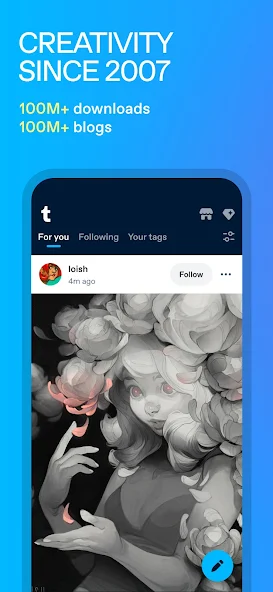

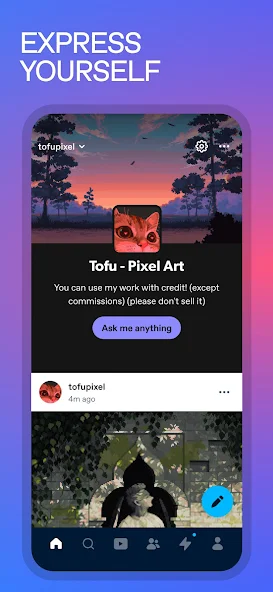

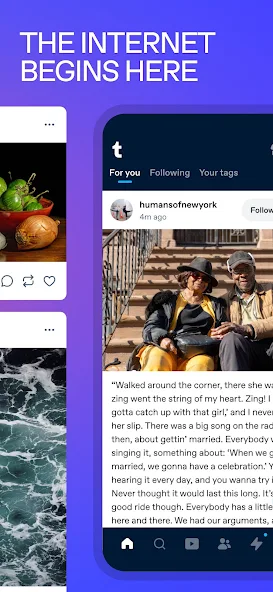

The Tumblr app brings blogging, photo sharing, and community discussion together in a single mobile experience that millions of people open every single day. Built by Automattic, the same company behind WordPress, Tumblr blends the creative freedom of a personal blog with the fast, scrollable feel of a modern social feed. Whether you want to share original art, join a fandom, or simply follow topics you love, the Tumblr app makes it easy to get started in minutes.
This guide walks through everything you need to know before you download the app, including its most useful features, how it compares to other social platforms, and the exact steps to install it safely on Android and iOS. You will also find a clear pros and cons breakdown along with answers to the most common questions new users ask. By the end, you will understand exactly why Tumblr continues to attract such a loyal, highly engaged community.
| Detail | Information |
|---|---|
| App Name | Tumblr: Social Media & Art |
| Developer | Automattic Inc. |
| Category | Social Networking, Blogging |
| Platforms | Android and iOS |
| Price | Free, with an optional Premium subscription |
| Ideal For | Bloggers, artists, fandoms, and community discovery |
What Is the Tumblr App?
Tumblr is a free microblogging and social networking platform that lets users publish text posts, photos, videos, GIFs, audio clips, quotes, and links from one simple dashboard. Unlike traditional social networks that limit formatting and design, Tumblr gives every blog its own personality through customizable themes, fonts, and layouts. It works as a mobile app on Android and iOS as well as a full website, so your posts, likes, and messages stay in sync no matter which device you use.

Each Tumblr account works like a personal blog with its own web address, but it also plugs into a much larger social graph through following, reblogging, and tagging. This mix of personal expression and community discovery is why Tumblr is often described as part blog, part social network, and part digital scrapbook. Founded in two thousand seven and later acquired by Automattic, the platform has spent years refining this balance between individuality and community.
Why Millions of Users Still Choose Tumblr
While many social platforms push short lived, algorithm driven content, Tumblr still rewards original posts, deep customization, and long form conversation through reblogs and tags. Its dashboard feels less like an advertising feed and more like a living scrapbook built entirely from the blogs you choose to follow. This is a major reason creative communities and younger audiences keep returning to the app even as newer platforms rise and fall.
Tumblr has also evolved with the times by introducing Tumblr Communities for topic based discussion, Tumblr Blaze for promoting posts, and an optional ad free Tumblr Premium subscription for a cleaner browsing experience. It has also started connecting with the wider fediverse, allowing posts to potentially reach compatible platforms beyond Tumblr itself. These updates show a platform that keeps improving rather than standing still, which keeps both new and long time users engaged.
Key Features of the Tumblr App
The Tumblr app packs a surprising number of tools into a clean, simple interface. Below are the standout features every user should know about before downloading and setting up an account.
Customizable Blog Themes
Every Tumblr blog can be redesigned with custom themes, fonts, colors, and even raw HTML for advanced users who want complete creative control. Free and premium themes are available directly inside the app, so beginners can pick a polished look without touching a single line of code. This level of personalization is rare among mainstream social apps and remains one of Tumblr’s biggest draws.
The Dashboard Feed
The dashboard is the heart of the Tumblr experience, pulling together posts from every blog you follow into one scrollable stream. Instead of a purely algorithmic feed, it favors the accounts and tags you actually chose, giving you far more control over what you see. It updates constantly, so fresh art, writing, and discussions appear the moment they are posted.
Reblogging and Post Trails
Reblogging lets you share someone else’s post to your own blog while preserving the full trail of everyone who reblogged it before you. This creates a transparent history of how a post traveled across the platform, unlike a simple repost or share. It also makes Tumblr an ideal place for collaborative jokes, evolving art threads, and long running community conversations.
Multimedia Post Support
The app supports text, photos, video, audio, GIFs, quotes, chat style posts, and links, all from a single upload menu. This flexibility means one blog can double as a photography portfolio, a personal diary, and a music sharing page at the same time. Few other platforms allow this many content formats to sit comfortably on a single profile.
Tumblr Communities
Tumblr Communities are topic focused spaces with their own moderators, guidelines, and dedicated feed, separate from your main dashboard. They make it easier to find people who share a specific interest, from a favorite show to a niche hobby, without wading through unrelated content. Joining a community is a quick way for new users to feel at home right after signing up.
Tags and Advanced Search
Tags act as the primary discovery tool on Tumblr, letting you follow a topic rather than just a single account. Advanced search operators make it possible to filter results by date range or specific keywords, which is especially useful for catching up on a fast moving fandom tag. This tag first approach to discovery is one of the clearest differences between Tumblr and typical social feeds.
GIF and Reaction Search
A built in GIF search makes it fast to find the perfect reaction image for a reply, an ask, or a standalone post. The search has been refined over time to return more relevant results, so finding the right vibe takes seconds rather than minutes. This small feature plays a big role in Tumblr’s playful, meme friendly culture.
Asks and Private Messaging
The Ask feature lets followers send questions or comments directly to a blog, with the option to answer publicly or keep the exchange private. A separate messaging inbox handles direct conversations, so casual chats and public engagement stay neatly separated. Together these tools make Tumblr feel far more personal and interactive than a typical broadcast style social feed.
Post Queue and Scheduling
The queue lets creators line up multiple posts to publish automatically throughout the day instead of posting everything at once. This is especially useful for art blogs, fan pages, and small creators who want a steady, predictable posting rhythm. Scheduling tools like this help maintain consistent activity without requiring constant manual posting.
Notes and Engagement Reactions
Every post tracks its notes, a combined count of likes, reblogs, and replies that shows exactly how far a post has traveled. Reply reactions add a lighter way to show appreciation for a comment without needing to write a full response. Together these engagement signals help creators understand which posts truly resonate with their audience.
Tumblr Blaze for Post Promotion
Tumblr Blaze is a self serve advertising tool that lets any blog pay to promote a post to a much wider audience across the app. It is built directly into the mobile experience, so boosting a post takes only a few taps from a blog’s own page. This makes it easy for artists, small brands, and community pages to reach new followers without ever leaving the app.
Ad Free Browsing with Tumblr Premium
Users who want a cleaner experience can subscribe to Tumblr Premium, which removes ads and unlocks a handful of extra customization perks. It remains entirely optional, so the core Tumblr experience stays free for everyone who prefers not to subscribe. This gives users a straightforward choice between a free, ad supported app and a paid, ad free alternative.
Fediverse and Open Network Support
Tumblr has been rolling out support for the open ActivityPub protocol, the same technology that powers Mastodon and other federated networks. This allows posts and follows to potentially reach compatible platforms beyond Tumblr’s own walls, expanding a blog’s audience without any extra effort. It reflects a broader shift across the internet toward open, interconnected networks rather than closed platforms.
Privacy and Content Controls
Built in safe mode, content filtering, and blog level privacy settings let every user decide who can see their posts and what kind of content appears in their dashboard. Blocking and reporting tools are easy to find, which helps keep interactions on the platform respectful. These controls make it simple to tailor the app to a comfortable, personal experience.
Tumblr vs Other Social Media Apps
Tumblr shares some traits with other major platforms, but its blend of blogging, customization, and community sets it apart. The table below compares Tumblr with a few of its closest alternatives across the categories people compare most often.
| Aspect | Tumblr | |
|---|---|---|
| Primary Content | Text, photos, video, GIFs, audio | Photos and short video |
| Customization | Full theme and HTML control | Minimal, fixed layout |
| Community Style | Fandom and interest based | Influencer and lifestyle focused |
| Anonymity | Blog names and pseudonyms welcome | Real name culture common |
| Best For | Creative blogging and fandom culture | Visual branding and influencers |
As the comparison shows, Tumblr sits in its own category rather than competing head on with any single app. It offers the visual variety of Instagram, the pseudonymous freedom of Reddit, and the real time energy of Twitter, all wrapped inside a platform that also lets you fully customize your blog’s design.
Pros and Cons of the Tumblr App

Pros & Cons
Pros
- Deep, genuine customization through themes, fonts, and HTML
- Strong niche communities built around fandoms and shared interests
- Multiple content formats supported in a single post
- Optional ad free experience through Tumblr Premium
- Reblog trails preserve credit and post history automatically
- Core features remain completely free to use
- Tag based discovery surfaces content beyond your existing follows
Cons
- Advanced customization has a learning curve for total beginners
- Smaller mainstream audience compared to the largest social platforms
- A few extra perks are locked behind the Premium subscription
- Content discovery depends heavily on tagging habits and accuracy
- Some interface elements feel less polished than newer competitor apps
How to Download and Install the Tumblr App

Getting Tumblr onto your phone only takes a few minutes, and the process is nearly identical whether you use Android or iOS. Always install the app through your device’s official app store to make sure you are getting a genuine, safely verified version. The steps below walk through the full process from start to finish.
Installing Tumblr on Android
First, open the Google Play Store from your app drawer or home screen. Next, type Tumblr into the search bar and select the official listing from Automattic Inc. Then tap the install button and wait for the download to finish, after which the app icon will appear automatically on your home screen ready to open.
Installing Tumblr on iOS
First, open the App Store on your iPhone or iPad. Next, search for Tumblr and choose the official app from the results. Then tap get, confirm with your passcode or face recognition if prompted, and wait for the installation to complete before opening the app to sign up or log in.
Setting Up Your Account After Installing
Once the app is open, you can sign up using an email address or continue with an existing Google or Apple account for a faster setup. You will be asked to choose a blog name and a few interests, which Tumblr uses to recommend blogs and tags right away. Completing this short setup process takes only a couple of minutes and leaves you with a dashboard already full of relevant content.
Tips to Get More Out of the Tumblr App
Following a mix of broad and niche tags is one of the fastest ways to build a dashboard that genuinely feels tailored to your interests. Spend a few minutes exploring tags related to your favorite fandom or hobby, then follow the blogs that consistently post content you enjoy. This small amount of early effort makes a noticeable difference in how quickly your feed starts to feel like home.
Customizing your blog theme, even with a simple free template, helps your page stand out and reflect your personality instead of blending in with everyone else. Using the queue to spread posts throughout the day keeps your blog active without requiring you to be online constantly. Engaging through thoughtful reblogs and replies, rather than only tapping like, tends to build far stronger connections within the community.
Is the Tumblr App Safe to Use?
The Tumblr app includes several built in safety tools, including content filtering, safe mode, and community guidelines that are enforced through active reporting and moderation systems. Users can block accounts, filter specific tags, and adjust who is able to send them messages directly. These controls give everyone a reasonable amount of say over what they see and who can reach them.
As with any app, the safest approach is to install Tumblr only through an official app store rather than an unverified third party website. Official stores automatically scan apps for malicious code and deliver trusted updates whenever new security or privacy improvements are released. Keeping the app updated and reviewing your privacy settings from time to time is the simplest way to stay protected while enjoying everything Tumblr has to offer.
Frequently Asked Questions
Final Thoughts
The Tumblr app remains one of the most creative, customizable corners of social media, blending personal blogging with genuine community discovery. From deep theme customization to features like Communities, Blaze, and an optional ad free Premium tier, it continues to evolve while keeping its core identity intact. Whether you are an artist, a fandom organizer, or simply someone who wants a calmer, more personal feed, Tumblr is well worth exploring.
Downloading the app takes only a few minutes through your device’s official app store, and setting up your first blog is even quicker. With this guide, you now understand the platform’s biggest features, how it compares to other social apps, and exactly how to install it safely. Give it a try, follow a few tags that match your interests, and see for yourself why so many people consider Tumblr their favorite place on the internet.