
Gaana APK Latest Version
★★★★☆ 4.3 · (12.1M Reviews)
8.58.1
45.12 MB
1B+
OS 7+
100% Secured & Verified APK Files
App Preview
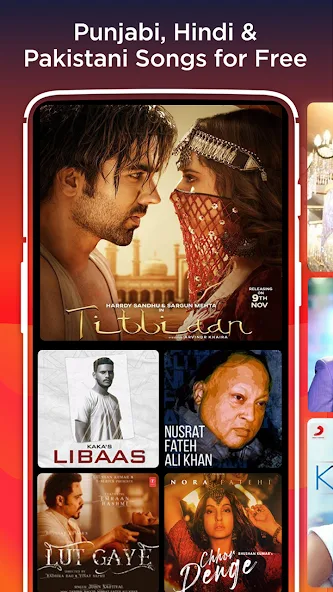

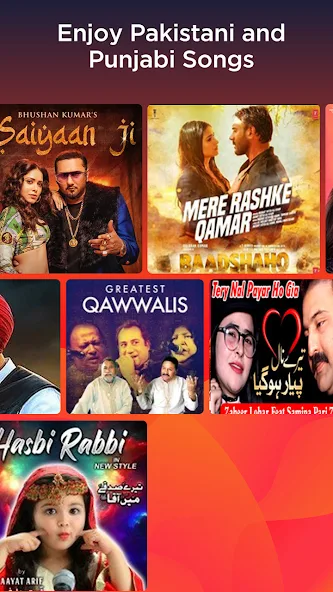
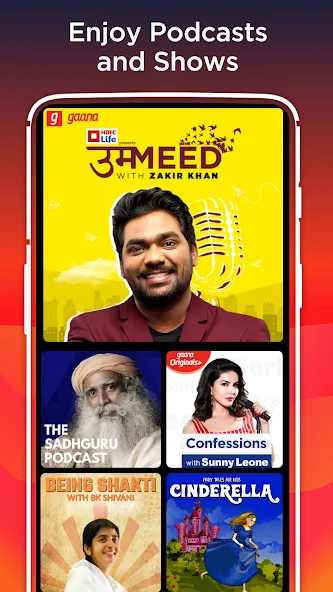
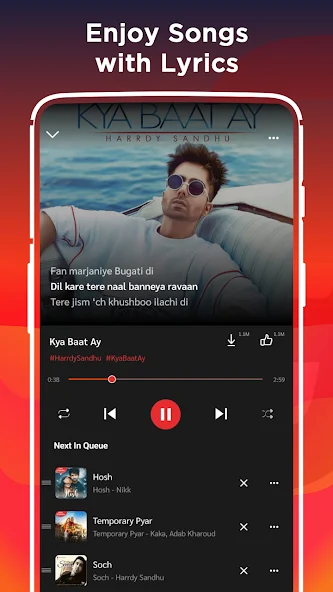
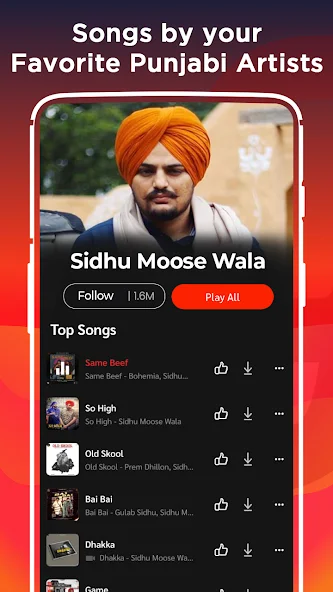
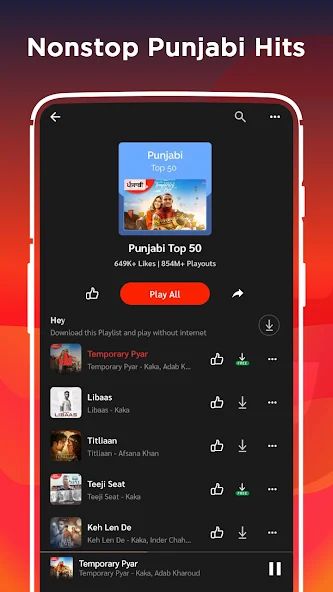
Gaana APK is one of the most popular music streaming applications in India and among the most recognized audio entertainment platforms in South Asia. If you love Bollywood songs, indie tracks, podcasts, or regional music, Gaana brings the entire audio universe to your smartphone in a clean, easy to use interface. In this complete guide you will learn what Gaana is, how it works, what features it offers, how to download the latest version of the app, and whether the free version is enough or if Gaana Plus is worth your money.
What is Gaana and Why It Stands Out
Gaana is a music and podcast streaming service that was launched in April 2010 by Times Internet, the digital arm of the Times Group. Over more than a decade, the platform has grown into a giant that hosts over 45 million songs across more than 40 languages. Whether you are a fan of Hindi film music, Tamil melodies, Punjabi beats, Telugu hits, Marathi folk, English pop, or international K pop and EDM, Gaana has a track ready for your ears.
The biggest reason Gaana stands out from competitors is its focus on the Indian audience. While global platforms like Spotify and Apple Music do serve India, Gaana understands regional preferences, regional artists, and the way Indians actually discover music. From devotional bhajans to romantic old songs to trending reels soundtracks, Gaana keeps a strong catalog that reflects local taste.
Key Features of Gaana
Gaana APK is more than just a song player. It is a complete audio entertainment hub. Below is a quick look at the features that make Gaana worth installing on your Android or iOS device.
Cross Device Sync
Your Gaana account works across mobile, web, and smart speakers. You can start a song on your phone and finish it on your laptop without missing a beat.
Smart Search and Voice Search
You can search by song title, movie name, artist, album, or lyrics. The voice search option lets you simply speak the name of the song and Gaana finds it for you.
Offline Downloads
With a Gaana Plus subscription you can download songs, albums, and playlists for offline listening. This is perfect for flights, metro rides, and areas with weak internet.
High Quality Audio
Gaana supports HD audio streaming so every beat and vocal comes through clean. Premium users can enjoy even higher bitrate streams for richer sound.
Lyrics on Screen
If you love singing along, Gaana shows lyrics in real time while songs play. The lyrics are synced with the music so you always know the next line.
Podcasts and Audio Stories
Gaana is not only about music. It hosts a wide selection of podcasts in Hindi, English, Tamil, Telugu, and other languages. You can listen to news, comedy shows, business updates, true crime, and motivational stories.
Curated Playlists and Radio Stations
Gaana offers thousands of editorial playlists built around moods, genres, decades, and activities. You will find playlists for workouts, late night drives, study sessions, parties, romance, and even bhajans for the morning. Gaana Radio also lets you create endless stations based on a single song or artist.
Massive Music Library
Gaana gives you access to more than 45 million songs. You will find Bollywood blockbusters, indie music, ghazals, devotional tracks, classical ragas, and trending international songs. The library is updated daily so you will rarely run out of fresh content.
Gaana Free vs Gaana Plus Comparison
Below is a clear comparison table that shows what you get with the free version and what extra benefits the Gaana Plus subscription unlocks.
| Feature | Gaana Free | Gaana Plus |
|---|---|---|
| Music streaming | Yes with ads | Yes without ads |
| Audio quality | Standard | HD and high bitrate |
| Offline downloads | Not available | Unlimited downloads |
| Skip limit | Limited skips per hour | Unlimited skips |
| Background play | Available | Available |
| Lyrics on screen | Yes | Yes |
| Podcasts | Yes | Yes |
| Mobile + web access | Yes | Yes |
| Price | Free | Paid subscription |
For most casual listeners the free plan is enough. If you commute daily, hate ads, and want offline access, Gaana Plus gives strong value for a small monthly fee.
How to Download and Install Gaana
Getting Gaana on your device takes only a few minutes. Follow the steps below to install the latest version safely.
For Android Users
For iOS Users
For PC Users
Gaana does not have an official desktop app, but you can still enjoy the service on a computer.
Gaana App Interface Walkthrough
The Gaana interface is designed to be simple for new users and powerful for music lovers. Let us break down the main sections of the app so you feel at home right away.
Home Tab
The Home tab is where your personal feed lives. You will see greeting cards, daily mixes, top charts, recommended playlists, and new releases tailored to your taste. The layout is clean and easy to scroll.
Search Tab
The Search tab lets you find songs, albums, artists, podcasts, and radio stations. You can also use the voice search icon to speak the name of a track instead of typing.
My Music Tab
The My Music tab is where all your saved content lives. You will see your favorite songs, downloaded tracks, playlists you created, followed artists, and listening history.
Radio Tab
The Radio tab lets you create endless stations. Pick a song, artist, or mood and Gaana will play a continuous stream of similar tracks.
Podcast Tab
The Podcast tab gives you quick access to popular shows, new episodes, and audio stories across multiple categories.
Settings Tab
The Settings tab lets you control streaming quality, download preferences, notification settings, account details, and subscription options.
Tips to Get the Most Out of Gaana
Below are some useful tips that will help you enjoy Gaana like a pro.
Build a Personal Library
Tap the heart icon on any song to add it to your favorites. Create custom playlists for workouts, road trips, parties, or sleep. The more organized your library, the faster you will find what you need.
Use Smart Downloads
Gaana Plus lets you set a smart download limit. The app will automatically download a mix of your favorite songs so you always have music ready offline.
Explore Regional Music
Do not stick only to Bollywood. Gaana has rich catalogs in Punjabi, Tamil, Telugu, Bhojpuri, Bengali, Marathi, Malayalam, Kannada, and more. Spend time exploring regional charts to discover new favorites.
Follow Artists
When you follow an artist, Gaana will notify you whenever that artist releases a new song, album, or video. This way you never miss new music.
Try Gaana Live
Gaana Live is an in app feature that streams live concerts, exclusive artist sessions, and special DJ nights. Keep an eye on the home page for upcoming live events.
Enable Equalizer Settings
In audio settings you can choose from preset equalizer modes like bass boost, vocal boost, or acoustic. This gives you finer control over the sound signature.
Connect With Smart Speakers
Gaana works with Alexa and Google Assistant. You can play songs, pause music, or change playlists using voice commands on your smart speaker.
Is Gaana Safe and Legal
Gaana APK is a fully legal and licensed music streaming service. It pays royalties to music labels and artists, which means the songs you stream are officially licensed. The app is safe to install from the Google Play Store and Apple App Store. Always avoid downloading Gaana from third party APK websites since modified versions can contain malware or may violate the law. For the safest experience always use the official store or the official website.
Who Should Use Gaana
Gaana is a great fit for many types of users. Here is a quick guide.
Bollywood and Regional Music Fans
If you love Indian film music and regional tracks, Gaana has one of the deepest catalogs available.
Podcast Listeners
With a strong lineup of Hindi and English podcasts, Gaana doubles as a podcast platform.
Budget Conscious Users
The free tier offers a lot of value for users who do not want to pay for music.
Travelers and Commuters
With offline downloads and a simple interface, Gaana is perfect for long commutes and travel.
Common Issues and How to Fix Them
Sometimes you might face small issues while using Gaana. Below are common problems and simple fixes.
Songs Not Playing
Check your internet connection. If you are on mobile data, make sure background data is allowed for Gaana. Restarting the app also fixes temporary glitches.
App Crashing
Update Gaana to the latest version from the Play Store. If the issue continues, clear the app cache from your phone settings.
Login Problems
Make sure you are using the correct phone number or email. If you forgot your password, use the reset option on the login screen.
Download Not Working
Download only works with Gaana Plus. If you have a Plus plan, make sure you have enough storage space on your device.
Gaana vs Other Music Apps
Below is a quick comparison table to help you decide between Gaana and other popular music apps in India.
| Platform | Music Library | Free Plan | Offline Mode | Best For |
|---|---|---|---|---|
| Gaana | 45 million plus | Yes with ads | Paid only | Indian and regional music |
| Spotify | 100 million plus | Yes with ads | Paid only | Global discovery and playlists |
| JioSaavn | 80 million plus | Yes with ads | Paid only | Bollywood and podcasts |
| Wynk | 30 million plus | Yes with ads | Paid only | Jio users |
| Apple Music | 100 million plus | No | Paid only | Apple ecosystem users |
Gaana shines when your focus is on Indian music, regional content, and local podcasts.
Gaana Subscription Plans and Pricing
Gaana Plus is the premium tier that unlocks the full power of the platform. Pricing may vary by region and current offers, but the general structure is simple and budget friendly. There is usually a monthly plan for users who want flexibility, an annual plan for users who want better value, and a family plan that lets multiple people share one subscription. Students often get a special discounted rate if they verify their status. Always check the latest pricing inside the app since Gaana frequently runs promotional deals for new users.
How Gaana Handles Music Discovery
Discovery is one of the strongest pillars of Gaana. The platform uses machine learning to study your skips, saves, repeats, and listening time. Based on these signals it builds a personal feed that improves with every session. You will notice that the home screen changes daily, surfacing new releases, forgotten gems, and songs from artists similar to the ones you already love. The Discover Weekly style playlist in Gaana is called Gaana Mix and it refreshes every week with a fresh selection of tracks tailored to you.
Gaana for Content Creators and Independent Artists
Gaana has been expanding support for independent artists through its distribution partnerships. Independent musicians can upload their work and reach millions of listeners across India. The platform also features curated indie playlists that highlight new talent. If you are a creator looking for a wider audience in India, Gaana can be a powerful addition to your distribution strategy.
Audio Quality and Streaming Technology
Audio quality matters for true music fans. Gaana streams most tracks at 128 kbps on the free plan, which is good for casual listening. Gaana Plus upgrades the bitrate to 320 kbps for a noticeably richer sound. The app also uses adaptive streaming, which means it adjusts the quality on the fly based on your internet speed. This prevents buffering in weak networks and saves data when you are on a limited mobile plan.
Gaana on Smart TVs and Wearables
Beyond phones, Gaana works on Android TV, Apple TV, Fire TV, and select smart TVs. You can cast music from your phone to a TV using Chromecast. The platform also has a Wear OS app so you can control playback from your smartwatch. This makes Gaana a true multi device companion that fits every part of your daily routine, from morning workouts to late night listening sessions.
Privacy and Data Practices
Gaana collects basic usage data to personalize recommendations and improve the service. The app allows you to manage notification preferences, personalized ad settings, and data sharing options from the privacy section. If you care about your data, take a few minutes to review these settings after installation. You can also delete your account permanently if you decide to stop using the service.
Final Recommendation
Gaana remains a top choice for Indian music lovers and podcast fans. It blends a deep local catalog with modern streaming features, smart discovery, and affordable pricing. Whether you stay on the free tier or upgrade to Gaana Plus, the experience is smooth, reliable, and enjoyable. Install the official app, explore the playlists, and let Gaana bring the soundtrack of India to your fingertips.

Pros & Cons
Pros
- Large Music Library with songs from different languages and genres.
- Indian Music Focus with a strong collection of Bollywood and regional tracks.
- Personalized Recommendations based on listening habits.
- Podcasts and Audio Content available alongside music.
- Offline Listening lets users download songs for listening without internet.
Cons
- Ads can interrupt the free listening experience.
- Some premium features require a subscription.
- Music availability can vary by region.
- The free version may have limited controls compared with premium.
- App performance may depend on your device and internet connection.
Final Thoughts on Gaana
Gaana APK continues to be a strong player in the Indian music streaming market. With a massive library, regional focus, smart recommendations, and affordable premium plans, it offers great value for music lovers. Whether you are a casual listener or someone who wants offline downloads and ad free streaming, Gaana has a plan for you. Install the latest version today, build your personal library, and let Gaana turn every moment into a soundtrack.
For more app reviews, app comparisons, and download guides, keep exploring nitroapk.com and stay tuned for fresh content every week.